Wednesday, September 28, 2016

SQL - Foreign Keys

Removing Obsolete Data

            One of my clients recently discussed their irritation at deleting obsolete records in parent tables that had many child table relationships. They had developed an extensive cleanup process to back-into their table relationships, deleting records from the child tables first then moving upwards in through the table relationships by following their database design charts. While I certainly understand that and similar methods, I think we can improve upon the process by designing databases more efficiently and changing some table designs. One thing I am going to cover here is the result of designing and altering tables to deter the initial problem. We know that due to referential integrity the parent-child relationship will be maintained by the database. So let us change the rules a little. We are going to discuss how to use ON DELETE CASCADE upon our FOREIGN KEYS and alleviate the problem of cleaning up our database of obsolete data connected with parent-child relationships.

Foreign Keys

The idea behind creating foreign keys is to develop relationships that connect tables together. Therefore, the first table (parent) has a column that references a column in another table (child). The column in the first table can also reference another column within itself (self-reference). The most common foreign key relationship we usually think of is the former one (parent-child).
Figure 1  Parent-Child relationship
Between store.employees2.DIVISION_ID and store.divisions.DIVISION_ID

           In Figure 1, we can see that the employee table has a Foreign Key column named EMPLOYEES2_FK_DIVISIONS connecting it to the division table Primary Key DIVISION_ID column.  In this way, these two tables are linked and related.

Figure 3 DIVISION table

We also see that listed in Figure 2, that the EMPLOYEE table has a foreign key named “EMPLOYEES_FK_DIVISIONS” in the R_CONSTRAINT_NAME column and the associated constraint named “DIVISIONS_PK” which obviously matches the DIVISIONS_PK constraint in the Figure 3 where the DIVISIONS table has it listed as the DIVISIONS table’s Primary_Key. Figures 4 & 5 illustrate the CREATE TABLE syntax under Oracle 11g used to create these tables.


Figure 4 SQL to create the table EMPLOYEES2


Figure 5 SQL to create the table DIVISIONS

 Deleting the Child Relationships Through the Parent Connection
A useful purpose that can be extended through the use of foreign keys is in the maintenance and cleanup of old data, the very point of this article. By using the ON DELETE CASCADE clause you can specify that through the FOREIGN KEY, that is, a Parent table which is having a row deleted, can act as the catalyst to allow any matching rows to be deleted in associated Child tables. After identifying these table relationships in your database design, you could write the following ALTER TABLE syntax (Figure 6) while you are in the creation mode to prepare for future maintenance ahead of time.


Figure 6 ON DELETE CASCADE

            By logically choosing the correct data flow, you can prepare your design to remove all associated records, that is child records, when a parent record is deleted. Consider a company that closes Division X after moving some employees to Division Y. When Division X is finally removed from the database, its Primary Key will drop and all associated Foreign Key relationships should drop as well. This is because the employee records still remaining and associated with Division X, drop as a result of the ON DELETE CASCADE.

            Play with this concept yourself in some test records that simulate your actual experience to get the concept clear in your mind. Then develop your new database with this concept in mind. Moreover, look at your current database and plan some table upgrades into your next iteration of software upgrades where this method of maintenance will streamline your database maintenance operations going forward.


Have an Insightful day!
Robert Majdak, Co-Founder
Crystal Majdak, Co-Founder
Management Insights

Sunday, September 11, 2016

SQL - Savepoints

Overview

Savepoints are a very handy feature in Oracle especially during development or data manipulation. The basic idea is that as a set of transactions are being accomplished; you can create a point in time to return the data without having to completely redo all work done. That is a tremendously valuable feature, let’s say you moved through 6 of 10 steps into your development process and decided you needed to only back track 1 step. With an intermittent savepoint in place, you can go backwards to that point into your development instead of rolling back all of your work in that session saving you valuable redevelopment time.

Here is How it Works

            I am going to setup some holiday pay bonuses now while I have plenty of time to consider how they hit our budget. For this discussion, I am going to limit the increases to department #80. The bonus is a function of a percentage of the employee’s salary and commission with the commission being used to decide the bonus multiple. The script used to populate the initial bonus data in the rec_merit_incr field of the employee table is shown in Figure 1.


Figure 1. Initial bonus data calculations.

            The commission breakpoint is .25 which decides whether an employee receives the .1 or the .075 bonus calculation. I would like to consider bumping the .075 up to .095 to get an updated sum for the holiday budget. Up to this point I have created new columns and populated data in support of the project. For the work so far set in place, I will create a SAVEPOINT named merit1 as shown in Figure 2. I name it in a way that another colleague will not likely create a similar SAVEPOINT name during this development session. Then I run the SAVEPOINT command.


Figure 2. Created SAVEPOINT.

      I will now continue the work by updating the calculation to .095 and running the SQL script for that subset of employees under consideration. You can easily see how employees like Christopher have a new merit increase test value. In aggregate, I decide that the increase for the entire employee subset is not yet budget supported so I return the data back to the original values in the system when SAVEPOINT merit1 was created.

Figure 3. Updating script and subsequent output.

Rolling back the data to the SAVEPOINT

            All I need to do to return the data to the pre-merit1 SAVEPOINT values is to enter the command into the system to rollback the data up to the merit1 SAVEPOINT. The system will then respond with "Rollback complete". See Figure 4.


Figure 4. Rolling back the data to the specified SAVEPOINT.

            We can then verify the data is in the correct state by verifying it using the script I used earlier before the .075 was changed to .095.


Figure 5. Data after the "ROLLBACK TO SAVEPOINT merit1" command.

Keep in mind that another scenario we could play out is to reduce other employees with higher bonus values or blend the subset with a budget compromising overall average. We might also consider budget-rebalancing ideas. Whatever the approach to be taken, we can use the SAVEPOINT feature in any transaction analysis to lockstep our way backwards as redevelopment dictates.

Video Highlights

Have an insightful day!
Robert Majdak, Co-Founder
Crystal Majdak, Co-Founder
Management Insights Team

Sunday, September 4, 2016

SQL – Pivot and Unpivot

Pivot
                                              
This week’s topic is aimed at understanding how database developers can deliver pivot and unpivot data orientation to data output. The Pivot and UnPivot clauses are new to Oracle Database 11g, the database that I am using in this article. The development environment I am using in the making of the screen captures is Oracle Developer Studio IDE. Often times Excel users need to take database output through reports they receive and massage it themselves in excel by creating pivot tables in order to view the data in a way that allows for identification of trends. For exactly the same purposes, we can do this across larger sets of data in the database itself leveraging its ability to process more complex code designs than otherwise practical in Excel. Further, it is possible to perform an aggregation function upon the data. In my example, I have an employee table where you will see that we have monthly salary and department data stored. Employee names and departments listed are meaningless for demonstration purposes. Following is the employee table, which we are going to pull the salary of each individual, and the department number that they are assigned. I minimized most of the unnecessary columns to show what we are really need. See Figure 1.

Figure 1 Employee Table

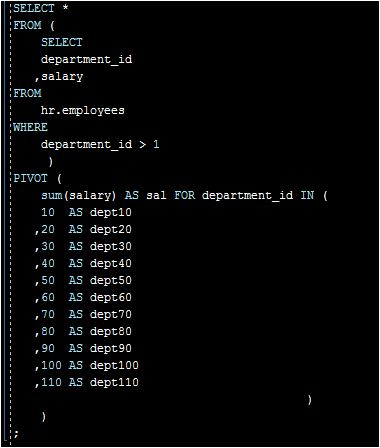
In the following sample script, I illustrate one way to write a very simple Pivot Clause. See Figure 2, Simple Pivot Clause.

Figure 2 Simple Pivot Clause

I am using a vertical format in my script strictly for illustrative purposes so you can follow my code and bracketing structure as easily as possible. The results produce cells that show the total salaries summed under each department in one row. See Figure 3.

Figure 3 Pivot Clause output

Unpivot

In preparation for this portion, I created a view we will query so we can unpivot the data shown in Figure 3. Here is one way to write a script to unpivot the data. The method I chose to unpivot is in the following script. See Figure 4.
Figure 4 UnPivot Clause

The SQL script results are much different than what we created in the Pivot Clause earlier. Now we have a vertical output listing each department in its own row with their adjacent salary totals. For organizational purposes, I then ordered the data in descending salary order. The output is shown in Figure 5.

Figure 5 Unpivot Clause output.

Depending on the user needs for information, you can greatly simplify the user experience using the Pivot and UnPivot Clauses in SQL. I hope this helps your understanding of Pivot and UnPivot in SQL coding projects you are called on creating in the future.


Insightfully yours,
Robert Majdak Sr., Co-Founder
Crystal Majdak, Co-Founder

Sunday, August 21, 2016

Burn Rate

Burn Rate and Cash Monitoring

            Burn Rate is a dot-com era term used to describe, in financial terms, the various stages a startup company goes through before achieving profitability while concurrently maintaining a sustainable level of operating cash. To be self-sustainable is to be working with net positive cashflows. Achieving this level makes the case easier for future funding efforts if additional resources are needed for the next level of growth. Unfortunately, many businesses operate in a manner in which their setup and continuous operations lead to a cash zero date certainty. Therefore, it is best to understand the burn rate and aggressively design the business to defeat the burn rate and achieve sustainability as to make the next funding round an option for business growth instead of a matter of survival.

            Burn rate therefore, measures the company’s sustainability and how practical it may be to invest into it. It is best then, to focus on solving the operating cash cycle throughout the financial periods. I offer a spreadsheet analysis on this topic in Fig 1.

Sustainable
Unsustainable
Operating revenues cash receipts:
Beginning revenue-driven receivables $
500,000
500,000
Sales, both cash and credit on income statement
5,000,000
2,500,000
Total
5,500,000
3,000,000
Less ending revenue-driven receivables
600,000
600,000
Total
4,900,000
2,400,000
Add ending balance of unearned revenues (a)
50,000
50,000
Total
4,950,000
2,450,000
Less beginning balance of unearned revenues
100,000
100,000
Cash collected for revenues (b) $
4,850,000
2,350,000
Cash paid for cost of goods sold:
Ending inventory $
400,000
400,000
Cost of goods sold on income statement
3,000,000
3,000,000
Total
3,400,000
3,400,000
Less beginning inventory
350,000
350,000
Total
3,050,000
3,050,000
Add beginning inventory-related payables
200,000
200,000
Total
3,250,000
3,250,000
Less ending inventory-related payables
150,000
150,000
Cash paid for cost of goods for resale $
3,100,000
3,100,000
Cash paid for any expense:
Beginning accrual $
15,000
15,000
Any expense on income statement
40,000
40,000
Total
55,000
55,000
Less ending accrual
10,000
10,000
Total
45,000
45,000
Add ending related prepaid amount, if any
10,000
10,000
Total
55,000
55,000
Less beginning related prepaid amount, if any
5,000
5,000
Cash paid for expense item $
50,000
50,000
Notes:
a Customers Advance Payments
b Whether Earned or Not
Burn-Rate
Gross
3,150,000
3,150,000
Net
1,750,000
(750,000)
Positive Cash Flow/ (Burn Rate) - Per Month
145,833
(62,500)
Cash Reserve
1,000,000
Sustainable for xMonths - 1 Month
-15


Figure 1. Sustainable versus Unsustainable

            In the sustainable business case, the business operations result in a net positive cash accumulation of $145.8K per month. Developing a business case to invest for business growth is an easier task than the unsustainable business case. In the unsustainable business case, which might be correctable, operations must focus on course correction. This business has a cash burn rate of $62.5K per month which if left unchecked means that its $1M cash reserve will be consumed in 16 months. In its 15th month, if not corrected, will need to be well on its way in executing its exit strategy.

            The concept of burn rate, while useful as a tool for past performance over a set of periods, for instance, the last 12 months, would also be useful as an operational dashboard gauge. For one of our clients, this tool became the means in which cash consumption versus cash reserves and operating cash balance was monitored. With cash being king, this gauge can become useful in setting operations decisions.

Video Highlights

Insightfully yours,
Robert Majdak Sr, Co-Founder
Crystal Majdak, Co-Founder
Management Insights Team

Sunday, August 14, 2016

Time Management - 101

Too Much To Do in Too Little Time

I created this for those business leaders and managers who are struggling with their time, their progress in their business or on getting their work done. Having been a worker-bee all though way through to leadership positions and multiple Startup business owner, so I understand the dilemma so let me set aside your argument about time. Been there, done that, get it. So let us wrap up this part fast and get to the point. First, now that you have all this responsibility in your profession you may have noticed that there is an exponential increase in your tasks and an inverse amount of available time to get them done. In the process, the pressure increases, the job gets bigger and you find it difficult to keep your arms around it. This is normal and you are not alone in this struggle. With some simple time management discipline, you can keep track of what is going on and what you need to get done without losing track of it all. Moreover, you will see your own progress documented before you and that makes the pressure go away and adds motivation as you see your progress develop.

So Now The Point

            Here is what we do about this. First, get a planner, I mean a really good planner. You are going to write in this, so bigger is better. In the first couple of weeks I recommend pencil to get used to it and to make lots of corrections. After that, I suggest a red pen for really important high priority entries. Green for completion line-out markings and blue-black for everything else. In my own personal planner, I use blue for communications entries (emails & phone calls). Also, the planner itself should have these three components or columns listed on it. See figure 1.

 Figure 1. Planner Columns


In Figure 1 the three columns are; a half-hour interval column for today, a Week At a Glance column, and a Note/To Do List column. The idea is simple however; it requires discipline to get started. Understand that this is intended to serve the most important person in your career, “you”. I assure you, that the tool will be so useful that it will become natural to you as you develop the habit of using it daily. This will be a home base for you, a dashboard, and a historical record of what you did when, which I find handy.

Now Let’s Get Things Done

The Notes / To Do List column should contain the really big and important stuff needing completion this week. It is where topics like “Widget-Maker #2 Installation” would go. Since you paid a gazillion dollars for it and it represents 20% of your next quarters production output, it is a big business project and a career milestone. That is why it is worth entering here. See Figure #2
Figure 2. Notes/To Do List

Next, you need to set a day when you want to meet with installers and your people to get an update on their collective progress. Last week, you were told this Friday they would be done. Now is the time to check up on their progress. You decide that Tuesday is a good time to check up on that, so record that in the Week At A Glance column. See Figure 3.


Figure 3. Week At A Glance

So now you have committed to a day to wrap this task up. 
Now you need to make time to do it.

Figure 4. Daily, Half-hour Interval

In figure 4 you set 9:00 a.m. to meet with your team and installers to check up on their progress. Keep the meeting to the 30 minute allocated. Part of controlling your time is, well, controlling your time. It is important that you do so and we will discuss that more at another time. For now, you have this scheduled so be as prompt as you expect your team to be, get to the point, remove any barriers to their progress, set up a follow-up time if need be and get on to the next task.

As your day progresses and things are done, you line-out the things you accomplished. You then get a sense of your progress towards your goals today. Further, if the hourly task you just lined-out is also in the weekly column, line-out that item as complete also. Then if that same task was listed in your important projects Notes / To Do List, check off the box to show it was done too, assuming the project is production ready. You either have a follow-up meeting coming or an installation confirmation meeting coming. Only in the latter scenario, when the machine is in production mode are you to check this project off as complete in the Notes / To Do List. At this point you are passing through checkpoints, not a major milestone.

What you have here is an at-a-glance dashboard of what progress you have made today and what you need to rollover to another day or week in your planner before you go home. You also get the same sense of your weekly progress. What is not done this week you rollover into next week. You also see your progress on the really important stuff. We have yet to see how Widget-Maker #2 Installation plays out so it stays put until completion, which is measured by its being in production mode. You should have top priority things done by Friday. If you do have unfinished big projects open, roll them over to next week’s sheet but write them down in red ink and/or label with an asterisk or write “LATE” next to it. Just do something that stands out to you to say that this was a rollover item from the prior week and really needs to be priority #1 and done in the coming week. If necessary, get help to get this done. Admin assistants and other team members are resources to help you. Write down their names and set time on your planner to get with them and solicit their help.

In Review

Our example for the Widget-Maker #2 does not imply that it was installed. Only that you followed up on the installation progress. Implying that your planner will have big projects listed in small steps. As you work through the days and weeks ahead, you progressively achieve installation through a series of small steps. In addition, you see those steps manifest over time toward completion.

            This planner will really begin to show its value as you fill it for the first time. Just remember to roll things over when needed and to leave space in time to transition between scheduled events. This is a planner for activities for your time. It is NOT a checklist! Therefore, allow time for travel across town or across your business campus. Just do not put things back-to-back unless you are certain that you do not need space between events to travel, eat, take a restroom break, make closure notes whatever. I recommend the paper planner version first before ever thinking about electronic versions. Pencil is erasable, roll-on white-out is cheap and taking time to “think it through” will make you the master of your schedule and allow you to see things getting done. When you have spent a few months making consistent progress you can decide then whether to continue with paper or to move into electronic planners and deal with the risks and workarounds associated with using them.

Hazards

            The goal is to achieve, no rollover. Reducing rollovers with achievements means things are being done and your future days ahead will not be over-run with late projects. As a visual dashboard of your progress, either of these things will become apparent rapidly. On the point of electronic, paper planners can travel and are as current as you are in updating them. You get 100% visual feedback immediately. With electronic planners like Google calendar, you must have a 24/7 data plan with reliable connectivity to be 100% current. Later, I will be promoting this. For now, I want you to be free of technical issues, concentrate on your own mind, and hand control of your time. You are going to own this completely along the success you derive from it too. Stay with me in this a while longer.

Have a great day!
Robert Majdak, Co-Founder
Crystal Majdak, Co-Founder
Management Insights & Team